Setting Up Email Forwarding in Plesk
Email forwarding is a feature that automatically sends messages addressed to one email address to another recipient, or even to multiple recipients.
Why Use Email Forwarding
Email forwarding is useful when you have multiple email addresses and want to manage all messages from a single mailbox. It is also convenient when you need someone else to receive your emails—whether you are away, on vacation, or have a designated person handling your communications.
If you have already created a Mail Account in Plesk, you can easily set up an Email Forward with the steps provided below.
Forward your Mail to another email address, or to several addresses, by following these easy steps:
NOTE. To disable or remove an Email Forwarding, simply come back to this step and deselect this option.
- Access your Hosting Manager in Plesk
- Click Mail from the left-side menu.
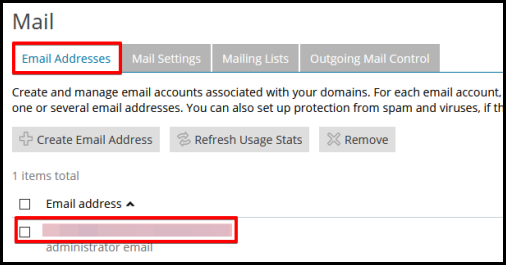
- Under the Email Addresses tab, click on the Email Address you would like to forward.
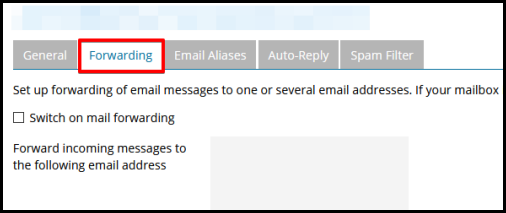
- Click on the Forwarding tab from the top menu.
- Select Switch on mail forwarding.
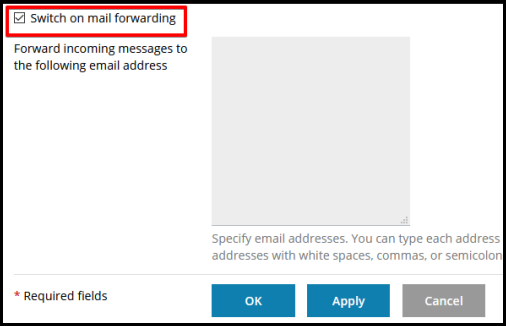
- In the box provided, specify the receiving email address where all the messages will be routed to. You can enter multiple email addresses by typing each address on a new line, or separating each address with white spaces, commas, or semicolons.
- Click the OK button.
NOTE. With Email Forwarding, emails will still be received by the original recipient and copies will be forwarded to the specified email address. If you would like to forward all emails and no longer receive emails in the main email, you can go back to Mail to select the Email address, then deselect Mailbox and click OK to save.