




Enhance your business with Google Gemini AI
Google workspace subscriptions and plans are now enabled with advanced AI features powered by Gemini AI for Gmail, Docs, and Meet, and also include NotebookLM & Gemini app.


Google Workspace Plans
-
 Best for Growing Businesses
-
 Best for Enterprises
- 1 Month
- 1 Year
- 30 GB Storage per User
- close Google Vault
- 100 Participants per Google Meeting
- close Record and Save Meetings
- close Advanced Endpoint Management
- done AI-powered Gmail
- close Gemini AI-powered Apps
- close AI Research Assistant
- 2 TB Storage per User
- close Google Vault
- 150 Participants per Google Meeting
- done Record and Save Meetings
- close Advanced Endpoint Management
- done AI-powered Gmail
- done Gemini AI-powered Apps
- done AI Research Assistant
- 5 TB Storage per User
- done Google Vault
- 500 Participants per Google Meeting
- done Record and Save Meetings
- done Advanced Endpoint Management
- done AI-powered Gmail
- done Gemini AI-powered Apps
- done AI Research Assistant
- 30 GB Storage per User
- close Google Vault
- 100 Participants per Google Meeting
- close Record and Save Meetings
- close Advanced Endpoint Management
- done AI-powered Gmail
- close Gemini AI-powered Apps
- close AI Research Assistant
- 2 TB Storage per User
- close Google Vault
- 150 Participants per Google Meeting
- done Record and Save Meetings
- close Advanced Endpoint Management
- done AI-powered Gmail
- done Gemini AI-powered Apps
- done AI Research Assistant
- 5 TB Storage per User
- done Google Vault
- 500 Participants per Google Meeting
- done Record and Save Meetings
- done Advanced Endpoint Management
- done AI-powered Gmail
- done Gemini AI-powered Apps
- done AI Research Assistant
- 1 Month
- 1 Year
- Unlimited Storage per User
- done Google Vault
- 500 Participants per Google Meeting
- done Record and Save Meetings
- close Client-side Encryption
- close Work Insights
- 10,000 Participants In-domain and Trusted Domain Streaming
- done AI-powered Gmail
- done Gemini AI-powered Apps
- done AI Research Assistant
- Unlimited Storage per User
- done Google Vault
- 500 Participants per Google Meeting
- done Record and Save Meetings
- done Client-side Encryption
- done Work Insights
- 100,000 Participants In-domain and Trusted Domain Streaming
- done AI-powered Gmail
- done Gemini AI-powered Apps
- done AI Research Assistant
- Unlimited Storage per User
- done Google Vault
- 500 Participants per Google Meeting
- done Record and Save Meetings
- close Client-side Encryption
- close Work Insights
- 10,000 Participants In-domain and Trusted Domain Streaming
- done AI-powered Gmail
- done Gemini AI-powered Apps
- done AI Research Assistant
- Unlimited Storage per User
- done Google Vault
- 500 Participants per Google Meeting
- done Record and Save Meetings
- done Client-side Encryption
- done Work Insights
- 100,000 Participants In-domain and Trusted Domain Streaming
- done AI-powered Gmail
- done Gemini AI-powered Apps
- done AI Research Assistant
Empowering Every Business with Tools to Innovate
- Communicate
- Create & Collaborate
- Manage & Store
- Power of Gemini

 Gmail
Gmail
A professional business email with google featuring all the powerful tools of gmail workspace and gmail enterprise email.
 Calendar
Add reminders, schedule meetings, and never miss a thing with Google's smart calendar integrated into your google workspace for business.
 Meet & Chat
Stay connected via HD video calls and instant messages using Meet and Chat across your google workspace business email.

 Create and Share Content
Create content via docs, sheets, slides & more with real-time collaboration using the classic google suites experience.
Intelligent Collaboration
Collaborate in real time, store your files in the cloud and share and access them from anywhere with your google for business email.
 Smart Cloud Search
Search across all your organization's content. From Gmail and Drive to Docs, Sheets, Slides, Calendar, and more within your google workspace account.

 Efficient management
Manage users, groups, account permissions and migrate existing accounts from the Admin Console.
 Data Archiving
Retain and manage how your data is stored with Vault.
 Security
Give access to your employees on their devices while keeping your corporate data secure with Endpoint Management and reliable google workspace email hosting.

 AI Assistance
Use powerful google workspace ai assistance in tools like Gmail, Docs, Sheets, Meet, Chat, Vids, and more.
 Gemini Advanced
Learn, brainstorm & plan with Gemini AI to simplify complex projects including coding, research, and data analysis using your google workspace individual tools.
 NotebookLM Plus
NotebookLM uses AI & helps you to research and create audio notes.
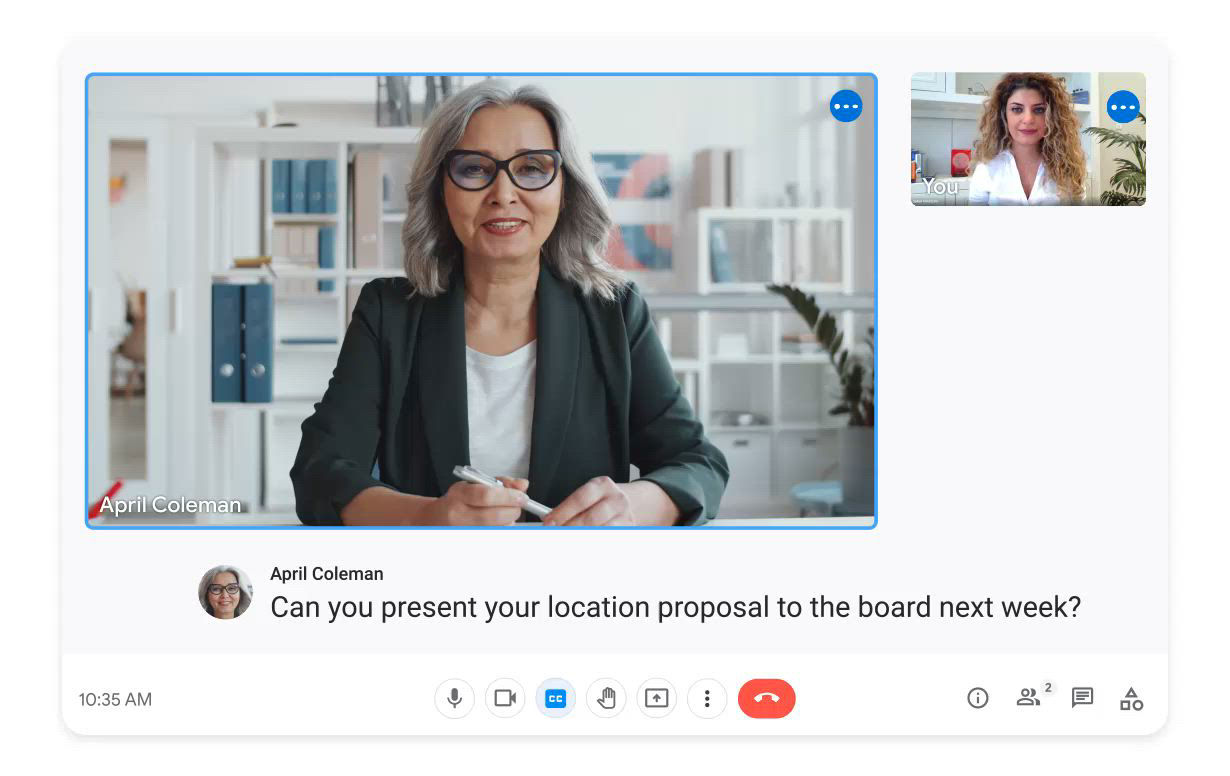
Virtual Workspace for Efficiency and Productivity
Having a hard time managing your files and email? Get a Workspace Google solution that helps you address these problems.
Access a cloud space that allows you to efficiently communicate and collaborate seamlessly using top-tier Google Workspace pricing.
Increase your team's productivity using a dedicated Google Workspace for business email.
Google Workspace Features
Usage arrow_forward_ios
Number of users
Email, document, photo storage per user
1-300
30 GB
1-300
2 TB Pooled
1-300
5 TB Pooled
Unlimited
Unlimited
Unlimited
Unlimited
Email usage and limits arrow_forward_ios
Attachment size limit (sending)
Attachment size limit (receiving)
Recipients per message (To, Cc, Bcc fields combined)
Unique recipients per day
25 MB
50 MB
2,000 (500 external)
3,000 (2,000 external)
25 MB
50 MB
2,000 (500 external)
3,000 (2,000 external)
25 MB
50 MB
2,000 (500 external)
3,000 (2,000 external)
25 MB
50 MB
2,000 (500 external)
3,000 (2,000 external)
25 MB
50 MB
2,000 (500 external)
3,000 (2,000 external)
Email security & compliance arrow_forward_ios
Junk email filtering and virus blocking
Gmail ads turned off
Custom filtering and content policies
Email and chat retention policies
Allowed IP addresses
User-managed denylists
Option to disable IMAP & POP access
Advanced phishing and malware protection
Vault for email/IM eDiscovery and archiving

~
~
Core and additional services arrow_forward_ios
Groups for Business
Chat services
Digital whiteboarding with Jamboard
Drive storage and Docs editors
Video conferencing with Meet
Directory management
Sites
Tasks
Notetaking with Keep
Additional Google services like YouTube, Blogger, Google Analytics, and more
Google Cloud Search for internal search and assist (across Google services, only)
Google Vault for eDiscovery
~
~
~
User access options arrow_forward_ios
Supported browsers
Access across devices (computers, phones, tablets)
Offline access
Microsoft Outlook
IMAP and POP Clients
Security and data protection arrow_forward_ios
Secure 2-Step Verification
Enforced SSL connections
Alert center: Notifications of potential security issues
Password monitoring and strength control
Set session length for Google Cloud services
Collaboration with trusted external domains
Choose a location (data region) for your data
Data protection insights report
Set session length for Google services
Data loss prevention (DLP)
Control access based on user and device context
Set session length for Google services
Cloud Identity Premium
Security center: Security Dashboard, investigation tool & Security health page
Fundamental data regions
Enterprise data regions
Client-side encryption
~
~
~
~
~
~
~
~
~
~
~
~
~
~
~
~
~
~
~
~
~
~
~
~
~
~
~
~
~
(Limited Features)
~
~
Migration products arrow_forward_ios
Migrate email (< 100 users)
Migrate email, calendars, contacts, files (many tools)
Migrate from Gmail or other webmail or Outlook
Have users migrate their data
Migrate from Exchange
Migrate from IMAP Servers or HCL Notes
Migrate from SharePoint, OneDrive, Box, or file shares
~
~
~
~
~
Reports and audit logs arrow_forward_ios
Usage trends of apps and users (many reports)
Audit logs of user and admin activity (many logs)
Advanced Drive auditing and reports
Google Meet attendance reports
Export reports to BigQuery
Access Transparency logs of admin activity
Work Insights reports for users
~
~
~
~
~
~
~
~
~
~
~
~
~
~
3rd-party app integration arrow_forward_ios
Single Sign On (SSO) using Google as IdP
Single Sign On (SSO) using a 3rd-party IdP
App catalog of 200+ preconfigured SAML apps
Autoprovisioning of SAML apps (maximum number)
Secure LDAP: Connect LDAP-based apps and services
3
~
Unlimited
~
Unlimited
Unlimited
Unlimited
Device management arrow_forward_ios
Basic endpoint management
Android app management
Advanced endpoint management (many features)
Selectively distribute mobile apps
Devices audit log or Report inactive company-owned device
Company-owned Android / iOS devices, Windows device management
iOS data protection
Remote device wipe (Windows)
Management rules
Third-party partner integrations
Mobile device certificates
~
~
~
~
~
~
~
~
~
~
~
~
~
~
~
~
~
~
~
~
~
~
~
~
~
~
Email addresses and mailing lists arrow_forward_ios
Your email address (you@yourcompany.com)
Additional addresses per user (sales@yourcompany.com)
Addresses at multiple domains (you@company2.com)
Admin and User controlled mailing lists
Advanced email delivery options arrow_forward_ios
Catch-all address
Email routing options for split and dual delivery
Inbound gateway and Outbound gateway
Outbound relay server (for alternative From: addresses)
Drive and Docs editors arrow_forward_ios
Google Drive for desktop
Turn Docs creation on or off
Connected Sheets
Shared drives for teams
Advanced Drive auditing and reports (Drive audit log)
Advanced Drive sharing permissions
Manage document approvals
Manage Drive metadata (custom labels and fields)
Organizational branding (custom templates)
~
~
~
~
~
~
Google Meet arrow_forward_ios
Maximum meeting length
Maximum number of participants per meeting
External participants
Secure meetings
Presentations and screen sharing
App for Android and iOS
Dial in (U.S. & international numbers)
Digital whiteboard
Add Meet video to Microsoft Outlook
Noise cancellation
Hand raising
Breakout rooms
Record meetings & save them to Drive
Polls
Q&A
Add co-hosts to meetings
Track attendance (requires 5 or more attendees)
Transcribe meetings & save them to Drive
In-domain and trusted domain live streaming
2 weeks / 336 hours
100
~
~
~
~
~
~
~
~
~
~
2 weeks / 336 hours
150
~
~
~
2 weeks / 336 hours
500
~
2 weeks / 336 hours
500
Upto 10k
2 weeks / 336 hours
500
Upto 100k
Google Chat arrow_forward_ios
Turn chat history on or off
Set space history option for users
External chat for 1:1 and group direct messages
Allow or restrict external chat
Allow or restrict Chat apps
Use discoverable spaces
Turn external spaces on or off
Control file sharing in Chat
Integrate Chat with third Party Backup Solution
~
~
~
~
~
~
Support arrow_forward_ios
99.9% uptime guarantee
24/7 support
Gemini AI features arrow_forward_ios
Gemini AI in Gmail
Gemini AI assistance in docs, sheets, slides, drive, chat
AI-powered Google Vids
NotebookLM AI Research Assistant
AI Security
~
~
~
~
~
~
~
See What Our Customers Are Saying
Google Workspace FAQs
When switching to Google Workspace from another program or web service, you can import your existing mail, contacts, and calendar data with you. You can migrate from Microsoft Exchange, Lotus Notes, IMAP servers, and other Google accounts.
Aside from the Gmail web interface, you can send and receive mail using your favorite desktop client. Set it up as IMAP or POP mail and you’re good to use it.
If you’re switching to Google Workspace from Microsoft Exchange or some other Outlook service, you can use Google Workspace Sync. This plug-in for Outlook 2003, 2007, 2010, or 2013 lets you use Outlook to manage your Google Workspace mail, calendar, and contacts, along with your Outlook notes, tasks, and journal entries.
Yes. Google Workspace is designed as an all-in-one solution with tools that work seamlessly together. Using these tools as a complete package improves productivity while giving your business the most value.
But, of course, you’re free to use the tools that you only need.
Pricing for the first 10 license seats would be different from the pricing for the subsequent license seats.
Google Workspace provides flexible pooled storage per user that is shared across the organisation. With the enterprise plan, customers have 5 TB of pooled storage per user. You can also increase it with the help of our Support Team.
Google Vault is an information management tool for Google Workspace. You can use it to retain, hold, search, and export users’ Google Workspace data as listed below:
• Gmail messages
• Drive files
• Google Chat messages (history turned on)
• Google Meet recordings and associated chat, Q&A, and polls logs
• Google Groups messages
• Google Voice for Google Workspace text messages, voicemails and their transcripts, and call logs
• New Google Sites
• Classic Hangouts messages (history turned on)
Some key AI features included in Google Workspace plans powered by Gemini include language and tone suggestions, formula suggestions, smart replies, and data analysis. With these powerful AI features you can write & summarize content, design graphical images, record meeting notes etc.
A summarized view of the Gemini AI features based on the plans are as follows:
Gemini App - Kickstart learning, creating, and planning. Or use Gems to build a team of AI experts to tackle complex projects - including coding, research, and data analysis.
Gemini in Gmail - Find, summarize, and write emails faster with Al.
NotebookLM - Accelerate team knowledge sharing by uploading your sources to get instant insights and podcast-like Audio Overviews.
Gemini in Docs, Sheets, and more - Tackle the blank page, visualize data, take notes in meetings, translate captions, make presentations shine, analyze files, and more with AI.
Google Vids - Our new video creation app to guide users through creating videos with visuals, music, and voiceovers.
AI Security - Automatically and continuously identify, classify, and label sensitive files across your organization with Al Classification in Drive.
~
~
~
Gemini
Advanced
NotebookLM Plus
~
Gemini
Advanced
NotebookLM Plus
Included in Enterprise Plus
24/7 Customer Care
Get expert advice for anything you need

