What is Domain Name: The Ultimate Guide for Beginners
A domain name is a special address used to find a website on the internet. It is like a virtual address that helps people find your website easily. For example, "google.com" is the domain name for the Google search engine.
Instead of remembering a long series of numbers (which is the actual IP address of the website), we can simply type the domain name into our web browser to access the site.
Domain names make it easier for us to remember and access websites without having to memorise complicated numerical addresses.
What is a Domain Name - Video Tutorial

What Part of a URL Contains the Domain Name?
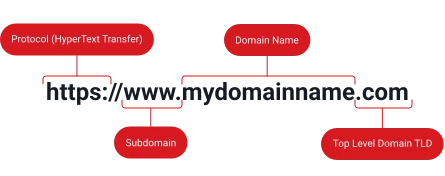
In a URL (Uniform Resource Locator), the domain name is the part that comes after the "http://" or "https://" and before the next forward slash "/". For instance, in the URL "https://www.example.com/page.html", the domain name is "example.com".
The domain name usually consists of two or more parts separated by dots. The part after the last dot (like ".com" or ".org") is called the top-level domain, which indicates the type of organisation that owns the domain. The part(s) before the last dot (like "example") is the second-level domain, which is the unique identifier for that website or organisation.
So, the domain name is the main address or "name" of the website, and it's easily recognisable in the URL as the part between "http://" (or "https://") and the next forward slash.
How Do Domain Names Work?
Domains work in a way that connects website names to the actual servers where the websites are hosted. It's like a big address book for the internet. Here's a simple explanation of how domains work:
- When you type a domain name (e.g., "example.com") into your web browser, your computer sends a request to a special computer called a DNS (Domain Name System) server.
- The DNS server acts like a directory or phonebook for the internet. It has a huge database that matches domain names with their corresponding IP addresses.
- An IP is a unique set of numbers that identifies the actual server where the website is stored. It's like a street address for a building.
- The DNS server looks up the domain you typed and finds the corresponding IP address in its database.
- The DNS server then sends that IP address back to your computer.
- Your computer uses the IP to connect to the server where your website is hosted and retrieve the website's files.
- Your web browser then displays the website on your screen.
This process happens almost instantly, making it seem like the website just appears when you type in the domain name.
The domain name system is essential because it's much easier for humans to remember and type words (like "example.com") than a string of numbers (like "192.168.1.1"). Domains act as a user-friendly way to access websites, while the IP addresses are used by computers to locate and communicate with the servers hosting those websites.
What are the Different Parts of a Domain?
A domain name is made up of several different parts to create a unique website address. Let's go through each part:
- Top-Level
- Second-Level
- Subdomains
Top-Level Domain (TLD)
The top-level domain (TLD) is the very last section of the domain name, coming after the final dot. Common examples are .com, .org, .net, .edu, and .gov. The TLD tells you what kind of entity owns that domain - .com means a commercial business, .org is usually non-profits, .edu is schools and universities, and .gov is government websites.
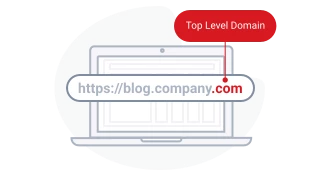
So, the domain name structure allows a single web address to provide information about what type of site it is, who owns it, and even different sections within that site. The different parts make the address unique.
Second-Level Domain (SLD)
Right before the TLD is the second-level domain (SLD), this is the main, unique name that identifies a website or organisation's online presence. Like "Google" in Google.com or "Wikipedia" in Wikipedia.org. No other site can have the same SLD.
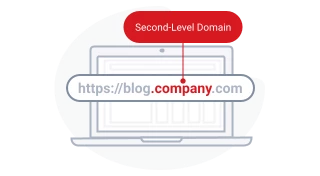
So, the domain name structure allows a single web address to provide information about what type of site it is, who owns it, and even different sections within that site. The different parts make the address unique.
Subdomains
Some domains also use subdomains that come right before the SLD. Subdomains allow different sections or pages within the main domain. For example, mail.google.com is a subdomain for Google's email service.
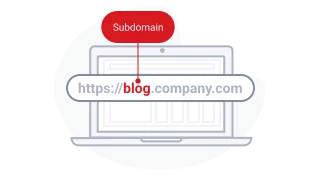
So, the domain name structure allows a single web address to provide information about what type of site it is, who owns it, and even different sections within that site. The different parts make the address unique.
How Many Types of Domain Names are There?
There are several different types of domain names, each with its own purpose and meaning:
- Generic
- Country Code
- Sponsored
- Brand
Generic Top-Level Domains (gTLDs)
These are the most common and recognisable domain extensions, such as .com (commercial), .org (organisation), .net (network), .edu (educational), and .gov (government).
In recent years, many new gTLDs have been introduced to cater to different industries, interests, or brands, such as .photography, .online, .xyz, and .tech.
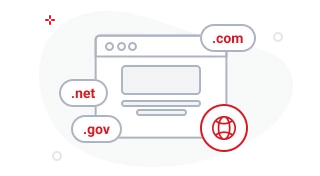
Each type of domain name serves a specific purpose and can help users identify the nature or origin of a website. For example, .com domains are typically associated with commercial businesses, while .edu domains are used by educational institutions.
Country Code Top-Level Domains (ccTLDs)
These extensions are based on the two-letter codes that represent different countries or territories, such as .uk (United Kingdom), .us (United States), .sg (Singapore) and .hk (Hong Kong).
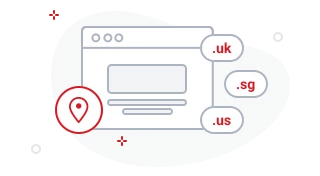
Each type of domain name serves a specific purpose and can help users identify the nature or origin of a website. For example, .com domains are typically associated with commercial businesses, while .edu domains are used by educational institutions.
Sponsored Top-Level Domains (sTLDs)
These domain extensions are sponsored and managed by specific organisations or communities, such as .aero (air-transport industry), .coop (cooperative associations), and .museum (museums).
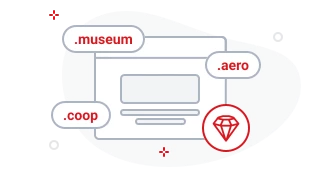
Each type of domain name serves a specific purpose and can help users identify the nature or origin of a website. For example, .com domains are typically associated with commercial businesses, while .edu domains are used by educational institutions.
Brand TLDs
Brand TLDs allow companies to create their own unique domain extensions that represent their brand or products. For example, .google, .microsoft, .apple, .bmw, and .canon are all examples of Brand TLDs owned by Google, Microsoft, Apple, BMW, and Canon respectively.

Each type of domain name serves a specific purpose and can help users identify the nature or origin of a website. For example, .com domains are typically associated with commercial businesses, while .edu domains are used by educational institutions.
How to Choose a Great Domain Name
Selecting the right domain name is crucial for establishing a strong online presence. Here's how to choose an effective domain name:
1. Keep it Short and Simple
Shorter domain names are easier to remember and type. Aim for 6-14 characters, avoiding complex words or unusual spellings.
2. Use Keywords Strategically
Incorporate relevant keywords that reflect your business or services. This helps improve SEO and makes your domain more descriptive.
3. Avoid Numbers and Hyphens
Numbers and hyphens create confusion and make the domain harder to share verbally. Stick to alphabetic characters.
4. Make it Memorable
Choose a name that is easy to pronounce and recall. If users can't remember your domain, they might end up on a competitor's site.
5. Consider the Right Domain Extension
While .com is still the most popular, consider industry-specific or regional TLDs like .net, .org, .co, or country-specific extensions.
6. Check Availability
Ensure your desired domain isn't already taken or trademarked. Use a domain search tool to verify availability.
7. Plan for the Future
Think long-term. Avoid trendy phrases or names that may limit your brand's growth as your business evolves. A great domain is simple, keyword-relevant, and memorable, forming a solid foundation for your online presence.
What is the Purpose of a Domain?


Domains are primarily used to provide addresses for websites on the internet, making it easier for people to find and access those websites. However, domains have several other uses as well. Here are some of the main purposes of domains:
1. Website Addresses
The most common use of domains is to serve as addresses for websites. Instead of having to remember long, confusing numbers (IP addresses), we can use easy-to-remember domain names like "google.com" or "example.org" to access websites.
2. Email Addresses
Domains are also used to create email addresses with a particular website or organisation. For example, if a company owns the domain "company.com," they can create email addresses like "info@company.com" or "john.doe@company.com."
3. Branding and Marketing
Companies want an online name that is easy to remember and matches their business. Having a good domain name helps customers find their website easily. It also helps the company look more professional and credible online.
4. Online Services
Domains can be used to provide access to various online services, such as cloud storage, online forums, or web applications. For instance, "dropbox.com" is the domain for the popular cloud storage service.
5. Personal Websites
Individuals can purchase domains to create personal websites, blogs, or online portfolios. Having a personalised domain like "johnsmith.com" can make a website look more professional and memorable.
6. Subdomains
Within a domain, subdomains can be created to organise different sections or services of a website. For example, "blog.example.com" could be a subdomain for a company's blog section.
7. Servers
Domains are also used to identify and connect to servers that host websites, applications, or other online services. Each server has a unique IP address, but a domain name makes it easier to access and remember.
What Else Do You Need with a Domain for a Website?
To use a domain effectively, you typically need a few key things. Let us explain them to you in simple terms:
1. Web Hosting
A domain name by itself doesn't make a website appear on the internet. You need a web hosting service, which is like renting space on a computer (server) to store your website's files. Without web hosting, your domain name won't be connected to any actual website content.

2. Domain Name Registrar
To get a domain name, you need to register it with a registrar. These are companies that manage domain names and ensure that each domain is unique.
3. Website Files
Once you have a domain name and web hosting, you'll need to create the actual files that make up your website. This can include HTML, CSS, JavaScript, images and other content. If you're not coding the website yourself, you may need a website builder or content management system (CMS) like WordPress.
Learn how to setup a website on WordPress.
4. DNS Settings
DNS is like an address book that connects your domain name to your web hosting server's IP address. You'll need to configure the DNS settings, usually through your registrar or hosting provider, to properly link your domain to your website files.
5. Email Service
If you want to create email addresses using your domain (like contact@yourdomainname.com), you'll need an email service or server that supports custom domain email. An excellent option to get started with is Titan Email Hosting, especially if you don’t need a whole lot of features in the beginning. As your business grows, it might make more sense to get a Managed Microsoft 365 Email that gives you access to Microsoft Office Suite as well, including Word, Excel, PowerPoint and much more.

6. SSL Certificate
For secure websites, especially those handling sensitive information or payments, an SSL certificate is essential to enable HTTPS encryption and display a padlock icon in the browser. While a domain name is a foundation, these additional components are typically required to make it functional and create a complete online presence. The process can seem complex at first, but many hosting providers offer bundled solutions to simplify setting up a domain-based website.
How Can I Purchase a Domain Name?
You can get a domain name from sources called domain registrars. They act as intermediaries between you and the organisations that oversee the domain name system.
To get a domain name, you typically follow these steps:
1. Choose a Registrar
First, select a domain registrar that you want to use. You can compare their prices, features and customer reviews to find the best one that suits your needs.
2. Search for Available Domains
Once you've chosen a registrar, you can use their search tool to check if your chosen domain name is available. If it's taken, try different variations or consider alternative domain extensions (like .net or .org).
3. Register the Domain
If your domain name is available, you can proceed to register it through the registrar's website. This usually involves steps like creating an account, providing your personal or business information and paying a registration fee.
4. Choose Domain Duration
Most registrars allow you to register a domain for a specific duration, typically ranging from 1 year to 10 years. Longer registration periods often come with discounts.
5. Configure Domain Settings
After registering, you may need to configure various settings related to your domain, such as DNS (Domain Name System) settings, email settings and domain privacy options.
Getting Started With Vodien
Setting up your domain with Vodien is a very simple process that allows you to establish your online presence easily.
1. Domain Search and Registration
Firstly, you need to search for and choose an available domain name that aligns with your website's purpose. Vodien provides a user-friendly tool to check the availability of your desired domain name. Once you've found a suitable domain, you can proceed with the registration process right away.
2. Account Creation
If you don't have an account with Vodien, you'll need to create one. This will serve as the hub for managing your domain, making it easy to modify, renew or transfer it when necessary.
3. Privacy Protection
After registering your domain, you'll need to configure the DNS settings. This process involves pointing your domain to your web hosting provider. Vodien provides simple tools to help you set up your website and email services seamlessly.
4. DNS Configuration
After registering your domain, you'll need to configure the DNS settings. This process involves pointing your domain to your web hosting provider. Vodien provides simple tools to help you set up your website and email services seamlessly.
5. Renewal Management
Vodien also offers the option to manage your domain's renewal settings. You can choose to set it to auto-renew, ensuring that you don't lose your domain inadvertently due to an expired registration.
6. Customer Support
Throughout the setup process, our Customer Support Team is available to assist you with any issues or answer your questions.
7. Additional Services
In addition to domain registration, Vodien also provides web hosting, email hosting and other web services, making it a convenient one-stop solution for all your online needs.
By setting up your domain with Vodien, you can establish a reliable and efficient foundation for your online presence, backed by their experience and range of services, ensuring a hassle-free and successful online journey.
See What Our Customers Are Saying
FAQs about Domain Names
A domain name serves as a distinct and memorable internet address to access websites, enhancing brand identity and making it easier for visitors to find and revisit a site. It plays a crucial role in establishing an online presence and credibility.
A domain name is used by linking it to a web hosting server where the website's files are stored. This allows people to access the site through a web browser by entering the domain name, which directs them to the hosted content.
To find your domain name and IP address, use network tools available on your hosting platform or through third-party websites. These tools can display your domain details and the associated IP address used to host your website.
Changing your domain name involves registering a new domain and then updating your website’s hosting configuration to reflect the new domain. This process also requires updating any associated branding and communications.
It is possible to obtain a free domain name through certain promotional offers from web hosting companies, typically as part of a web hosting package. These free domains are often available for a limited time before renewal fees apply.
Why Choose


Speed
Experience ultra-fast page loads and speedy email delivery with Vodien’s gigabit network — capable of the fastest data transmission and processing power.

Reliability
Keep your website online and up to speed 24/7. We’ve built our global data centres on world-class infrastructures backed by SLAs and monitored ’round the clock.

Affordable
We offer cost-effective premium services so you can have today’s fastest and most reliable web hosting experience without the huge price tag.

Service
Vodien is with you, anytime and anywhere for anything you need. Keep your business going online with prompt advice and expert solutions.
24/7 Customer Care
Get expert advice for anything you need

Call Us
4am - 8pm

Live Chat
Anytime